Building Argus SOC | Phase 1 | AI Triage Pipeline
Phase 1 of the Argus SOC build — wiring up the AI triage pipeline. Every Wazuh alert gets classified by Claude, routed by severity, and delivered as a formatted Telegram notification with PagerDuty escalation for critical events.
📌 Author’s note — This post documents the Argus SOC lab at the time of publication, when the Pi 3B+ served as the MSSP edge sensor and the Pi 5 hosted the vulnerable Docker targets. The architecture was redesigned in Phase 5, which introduced a ThinkCentre M920x running Proxmox with an Active Directory lab as the client infrastructure, and moved the edge-sensor role onto the Pi 5. The detection logic, custom rules, and gap analysis described here remain valid; only the host topology has changed.
Build carried out on real hardware in a controlled home lab. Claude (Anthropic) was used as a reasoning and writing assistant — all deployments, attacks, configurations, and verifications were performed by the author.
Overview
With Phase 0 complete and all hardware operational, Phase 1 builds the intelligence layer that makes Argus SOC more than a standard SIEM deployment. Every alert Suricata generates flows through Wazuh, gets triaged by Claude API, routed by severity, and lands as a formatted message in Telegram — or escalates through PagerDuty if it’s critical and goes unacknowledged.
All Phase 1 services install on the Hetzner VPS, co-located with Wazuh so webhooks stay on localhost and never leave the server.
The Problem This Solves
A typical Suricata deployment against the ET Open ruleset generates hundreds of alerts per day. DNS lookups, ICMP traffic, TLS version mismatches, connectivity checks — most of it is noise. Without triage, the operator is buried and real threats disappear into the volume.
This is the core problem in enterprise SOCs too. Alert fatigue is one of the primary reasons breaches go undetected for weeks. The solution here is the same pattern commercial XDR platforms use: route every alert through an AI layer that classifies severity, explains what happened in plain English, and maps it to MITRE ATT&CK — before the operator sees it.
In practice, Claude correctly classifies around 80% of ET Open rule hits as noise. Hundreds of daily raw alerts become 20–40 actionable items, with critical events surfaced immediately.
Step 1.1 — Install n8n on Hetzner
n8n is the workflow automation engine. It sits between Wazuh and Claude, receives alert webhooks, routes them through the triage script, and dispatches notifications. It’s co-located with Wazuh on the VPS so all webhook traffic stays on localhost.
1
2
3
4
5
6
7
# Install Node.js 20 LTS
curl -fsSL https://deb.nodesource.com/setup_20.x | sudo -E bash -
sudo apt install -y nodejs
node --version   # Should show v20.x

# Install n8n
sudo npm install -g n8n
Create a systemd service:
1
sudo nano /etc/systemd/system/n8n.service
1
2
3
4
5
6
7
8
9
10
11
12
13
14
15
[Unit]
Description=n8n Workflow Automation
After=network.target

[Service]
Type=simple
User=root
Environment=N8N_PORT=5678
Environment=N8N_PROTOCOL=http
Environment=WEBHOOK_URL=http://localhost:5678/
ExecStart=/usr/bin/n8n
Restart=always

[Install]
WantedBy=multi-user.target
1
2
3
sudo systemctl daemon-reload
sudo systemctl enable n8n
sudo systemctl start n8n
n8n is bound to localhost only — never expose port 5678 to the internet. Access it via SSH tunnel from the ThinkPad:
1
2
ssh -L 5678:localhost:5678 root@<HETZNER_IP>
# Then open: http://localhost:5678
Step 1.2 — Telegram Bot
The Telegram bot was already created in the prerequisites phase. Quick recap of the setup and a verification test:
1
2
3
4
5
6
7
# Get your chat ID (send any message to your bot first):
curl -s "https://api.telegram.org/bot<TOKEN>/getUpdates" | jq '.result[0].message.chat.id'

# Test the bot:
curl -X POST 'https://api.telegram.org/bot<TOKEN>/sendMessage' \
  -H 'Content-Type: application/json' \
  -d '{"chat_id": "<CHAT_ID>", "text": "✅ Argus SOC — Telegram integration test."}'
If you receive the message on your phone, the bot is working.
Step 1.3 — AI Triage Script
The triage script is the core of Phase 1. It receives raw Wazuh alert JSON, sends it to Claude with a structured prompt, and returns a classified JSON object that n8n uses for routing.
1
2
3
4
5
6
7
8
9
10
11
12
13
# On Hetzner:
pip install anthropic --break-system-packages

# Set your Anthropic API key
export ANTHROPIC_API_KEY="sk-ant-..."

# Make it persistent across reboots
echo 'export ANTHROPIC_API_KEY="sk-ant-..."' >> ~/.bashrc
source ~/.bashrc

# Create the triage script
mkdir -p ~/argus/scripts
nano ~/argus/scripts/ai_triage.py
1
2
3
4
5
6
7
8
9
10
11
12
13
14
15
16
17
18
19
20
21
22
23
24
25
26
27
28
29
30
31
32
33
34
35
36
37
38
39
40
41
42
43
#!/usr/bin/env python3
import sys
import json
import anthropic

MODEL = "claude-haiku-4-5-20251001"  # Haiku for cost-efficient L1 triage

SYSTEM_PROMPT = """You are a Level 1 SOC analyst performing alert triage.
Analyze the Wazuh alert JSON and respond ONLY with valid JSON in this exact schema:
{
  "severity": "noise | low | medium | critical",
  "summary": "Plain-English explanation of what happened and why it matters",
  "mitre_technique": "T1190",
  "mitre_technique_name": "Exploit Public-Facing Application",
  "recommended_action": "monitor | investigate | respond_immediately",
  "confidence": 0.95,
  "reasoning": "Why this classification was chosen"
}

Severity definitions:
- noise: Known benign patterns, expected traffic, internal monitoring
- low: Suspicious but low confidence, no immediate threat
- medium: Likely malicious, investigate during business hours
- critical: Active threat requiring immediate response

Network context: 192.168.1.0/24 is the lab network (trusted).
External IPs are untrusted. argus-edge-01 is the MSSP edge sensor."""

def triage_alert(alert_json: str) -> dict:
    client = anthropic.Anthropic()
    message = client.messages.create(
        model=MODEL,
        max_tokens=1024,
        system=SYSTEM_PROMPT,
        messages=[{"role": "user", "content": f"Triage this alert:\n{alert_json}"}]
    )
    response_text = message.content[0].text
    return json.loads(response_text)

if __name__ == "__main__":
    alert_json = sys.stdin.read()
    result = triage_alert(alert_json)
    print(json.dumps(result, indent=2))
1
2
3
4
5
chmod +x ~/argus/scripts/ai_triage.py

# Test with a sample alert
echo '{"rule":{"level":10,"description":"sshd: brute force trying to get access"},"data":{"srcip":"185.234.218.92"}}' \
  | python3 ~/argus/scripts/ai_triage.py
The script should return structured JSON with severity, summary, MITRE technique, and confidence score.
Step 1.4 — n8n Alert Workflow
Access n8n via SSH tunnel, then create a new workflow named “Argus SOC — Wazuh Alert Triage”.
Node 1 — Webhook
- Type: Webhook
- Method: POST
- Path:
/webhook/wazuh-alert
This is the entry point. Wazuh fires a POST to this URL for every alert above the configured level threshold.
Node 2 — Extract Alert Context
Code node — pulls the relevant fields from the raw Wazuh JSON:
1
2
3
4
5
6
7
8
9
10
11
12
13
const alert = $input.first().json;
return [{
  json: {
    rule_id: alert.rule?.id,
    rule_description: alert.rule?.description,
    rule_level: alert.rule?.level,
    agent_name: alert.agent?.name,
    srcip: alert.data?.srcip,
    dstip: alert.data?.dstip,
    mitre: alert.rule?.mitre,
    full_alert: JSON.stringify(alert)
  }
}];
Node 3 — Pre-filter
IF node — only route alerts level 10+ to Claude API. Without this, a single brute force session generates hundreds of API calls. The pre-filter cuts Claude API costs by ~80% while retaining all actionable alerts.
Configure the IF node with three separate fields in the n8n UI:
- Value 1 (left field):
{{ $json.rule_level }} - Operation (dropdown):
# Number > is greater than or equal Value 2 (right field):
10- Convert types where required : Toggle ON
Node 4 — Claude API Triage
HTTP Request node:
- Method: POST
- URL:
https://api.anthropic.com/v1/messages - Headers:
x-api-key: your Anthropic API keyanthropic-version:2023-06-01content-type:application/json
- Body (Raw JSON):
1
2
3
4
5
6
={{ JSON.stringify({
  "model": "claude-haiku-4-5-20251001",
  "max_tokens": 1024,
  "system": "You are a Level 1 SOC analyst. Analyze the Wazuh alert and respond ONLY with JSON: {\"severity\": \"noise|low|medium|critical\", \"summary\": \"plain English\", \"mitre_technique\": \"T1234\", \"mitre_technique_name\": \"name\", \"recommended_action\": \"monitor|investigate|respond_immediately\", \"confidence\": 0.95, \"reasoning\": \"why\"}",
  "messages": [{"role": "user", "content": "Triage this alert: " + $json.full_alert}]
}) }}
Node 5 — Parse Claude Response
Code node — extracts the classification from Claude’s response:
1
2
3
4
const response = $input.first().json;
const text = response.content[0].text;
const parsed = JSON.parse(text);
return [{json: {...$input.first().json, ...parsed}}];
Node 6 — Severity Router
Switch node — routes by {{ $json.severity }} with four cases: noise, low, medium, critical.
| Severity | Action |
|---|---|
| noise | Silent log only |
| low | Daily digest |
| medium | Telegram alert |
| critical | Telegram + PagerDuty |
Node 7 — Telegram Alert (medium + critical)
Telegram node (not HTTP Request) — use the built-in n8n Telegram node with credentials configured:
- Chat ID: your chat ID
- Message:
1
2
3
4
5
6
7
8
9
10
11
12
🚨 ARGUS SOC ALERT

Severity: {{ $json.severity.toUpperCase() }}
Rule: {{ $('Extract Alert Context').first().json.rule_description }}
Agent: {{ $('Extract Alert Context').first().json.agent_name }}
Source IP: {{ $('Extract Alert Context').first().json.srcip || 'N/A' }}
MITRE: {{ $json.mitre_technique }}

Summary: {{ $json.summary }}

Action: {{ $json.recommended_action }}
Confidence: {{ $json.confidence }}
Node 8 — PagerDuty Escalation (critical only)
HTTP Request node:
- Method: POST
- URL:
https://events.eu.pagerduty.com/v2/enqueue - Body:
1
2
3
4
5
6
7
8
9
{
  "routing_key": "<YOUR_PAGERDUTY_INTEGRATION_KEY>",
  "event_action": "trigger",
  "payload": {
    "summary": "{{ $json.summary }}",
    "severity": "critical",
    "source": "argus-soc"
  }
}
Node 9 — Log Event
Code node — logs every alert that passes through the pipeline, regardless of which path it took. This node receives inputs from three paths: the Pre-filter false output (filtered alerts), the Severity Router noise/low outputs (Claude-triaged but below Telegram threshold), and the post-Telegram/PagerDuty outputs (medium/critical alerts after notification).
The nested try/catch handles all three input paths gracefully — some paths have Claude’s classification available, others don’t:
1
2
3
4
5
6
7
8
9
10
11
12
13
14
15
16
17
18
19
20
21
22
23
24
25
26
27
28
29
30
31
32
33
34
35
36
37
38
39
40
41
42
43
44
45
let entry;
try {
  const alertContext = $('Extract Alert Context').first().json;
  try {
    const claude = $('Parse Claude Response').first().json;
    entry = {
      timestamp: new Date().toISOString(),
      severity: claude.severity,
      rule_description: alertContext.rule_description,
      rule_level: alertContext.rule_level,
      agent_name: alertContext.agent_name,
      src_ip: alertContext.srcip,
      mitre_technique: claude.mitre_technique,
      summary: claude.summary,
      confidence: claude.confidence,
      action: "triaged"
    };
  } catch (e2) {
    entry = {
      timestamp: new Date().toISOString(),
      severity: "filtered",
      rule_description: alertContext.rule_description,
      rule_level: alertContext.rule_level,
      agent_name: alertContext.agent_name,
      src_ip: alertContext.srcip,
      action: "pre-filter_dropped"
    };
  }
} catch (e) {
  const input = $input.first().json;
  entry = {
    timestamp: new Date().toISOString(),
    data: input,
    action: "logged_from_telegram_path"
  };
}
const workflowStaticData = $getWorkflowStaticData('global');
if (!workflowStaticData.events) {
  workflowStaticData.events = [];
}
workflowStaticData.events.push(entry);
if (workflowStaticData.events.length > 1000) {
  workflowStaticData.events = workflowStaticData.events.slice(-1000);
}
return [{ json: entry }];
Wiring Summary
The workflow has three paths that all converge on Log Event:
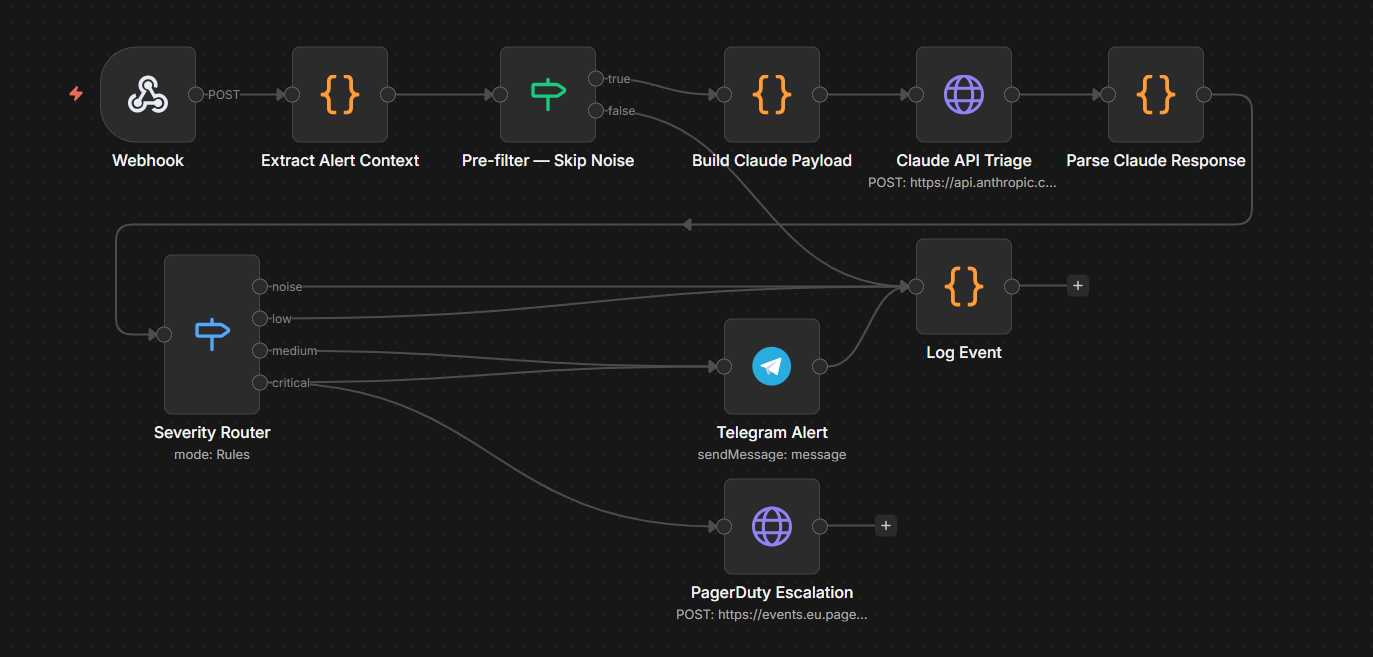 n8n alert workflow
Activate the workflow once all nodes are configured and wired.
Step 1.5 — Wazuh Webhook Integration
Wire Wazuh Manager to fire the n8n webhook for every alert above level 3:
1
2
# On Hetzner — create the integration script
sudo nano /var/ossec/integrations/custom-n8n
1
2
3
4
5
6
7
8
#!/bin/bash
ALERT_FILE=$1
WEBHOOK_URL="http://localhost:5678/webhook/wazuh-alert"

curl -s -X POST \
  -H "Content-Type: application/json" \
  -d @"${ALERT_FILE}" \
  "${WEBHOOK_URL}"
1
2
sudo chmod +x /var/ossec/integrations/custom-n8n
sudo chown root:wazuh /var/ossec/integrations/custom-n8n
Add to /var/ossec/etc/ossec.conf inside <ossec_config>:
1
2
3
4
5
6
<integration>
  <name>custom-n8n</name>
  <hook_url>http://localhost:5678/webhook/wazuh-alert</hook_url>
  <level>3</level>
  <alert_format>json</alert_format>
</integration>
1
2
sudo systemctl restart wazuh-manager
sudo systemctl status wazuh-manager
Step 1.6 — fail2ban
Active SSH brute force hits the Hetzner VPS within hours of deployment. fail2ban was already installed during the initial hardening — configure it properly now:
1
sudo nano /etc/fail2ban/jail.local
1
2
3
4
5
6
7
8
[DEFAULT]
bantime = 86400
findtime = 3600
maxretry = 3

[sshd]
enabled = true
port = ssh
1
2
3
4
5
6
7
8
9
sudo systemctl enable fail2ban
sudo systemctl restart fail2ban

# Verify SSH jail is active
sudo fail2ban-client status sshd

# Verify password auth is still disabled
sudo sshd -T | grep passwordauthentication
# Must return: passwordauthentication no
Phase 1 Verification Checkpoint
| # | Check | How to Test | Expected |
|---|---|---|---|
| 1 | n8n running | From ThinkPad: ssh -L 5678:localhost:5678 root@<HETZNER_IP> then open http://localhost:5678 | n8n UI loads, workflow “Argus SOC — Wazuh Alert Triage” visible and Active |
| 2 | Telegram bot | On Hetzner: curl -X POST 'https://api.telegram.org/bot<TOKEN>/sendMessage' -H 'Content-Type: application/json' -d '{"chat_id": "<CHAT_ID>", "text": "✅ Test"}' | Message appears on phone within 5 seconds |
| 3 | Claude API | On Hetzner: echo '{"rule":{"level":10,"description":"sshd brute force"},"data":{"srcip":"1.2.3.4"}}' \| python3 ~/argus/scripts/ai_triage.py | Returns valid JSON with severity, summary, mitre_technique fields |
| 4 | Full pipeline | From ThinkPad: nmap -sS <HETZNER_IP> — wait 60 seconds | Telegram message arrives with Claude’s classification showing MITRE technique and plain-English summary |
| 5 | PagerDuty | On Hetzner: curl -X POST https://events.eu.pagerduty.com/v2/enqueue -H 'Content-Type: application/json' -d '{"routing_key":"<KEY>","event_action":"trigger","payload":{"summary":"Test critical alert","severity":"critical","source":"argus-soc"}}' | PagerDuty incident created, push notification on phone |
| 6 | Routing correct | Check n8n execution history after nmap scan | Level 3–9 alerts: Telegram silent. Level 10+ alerts: Telegram message received |
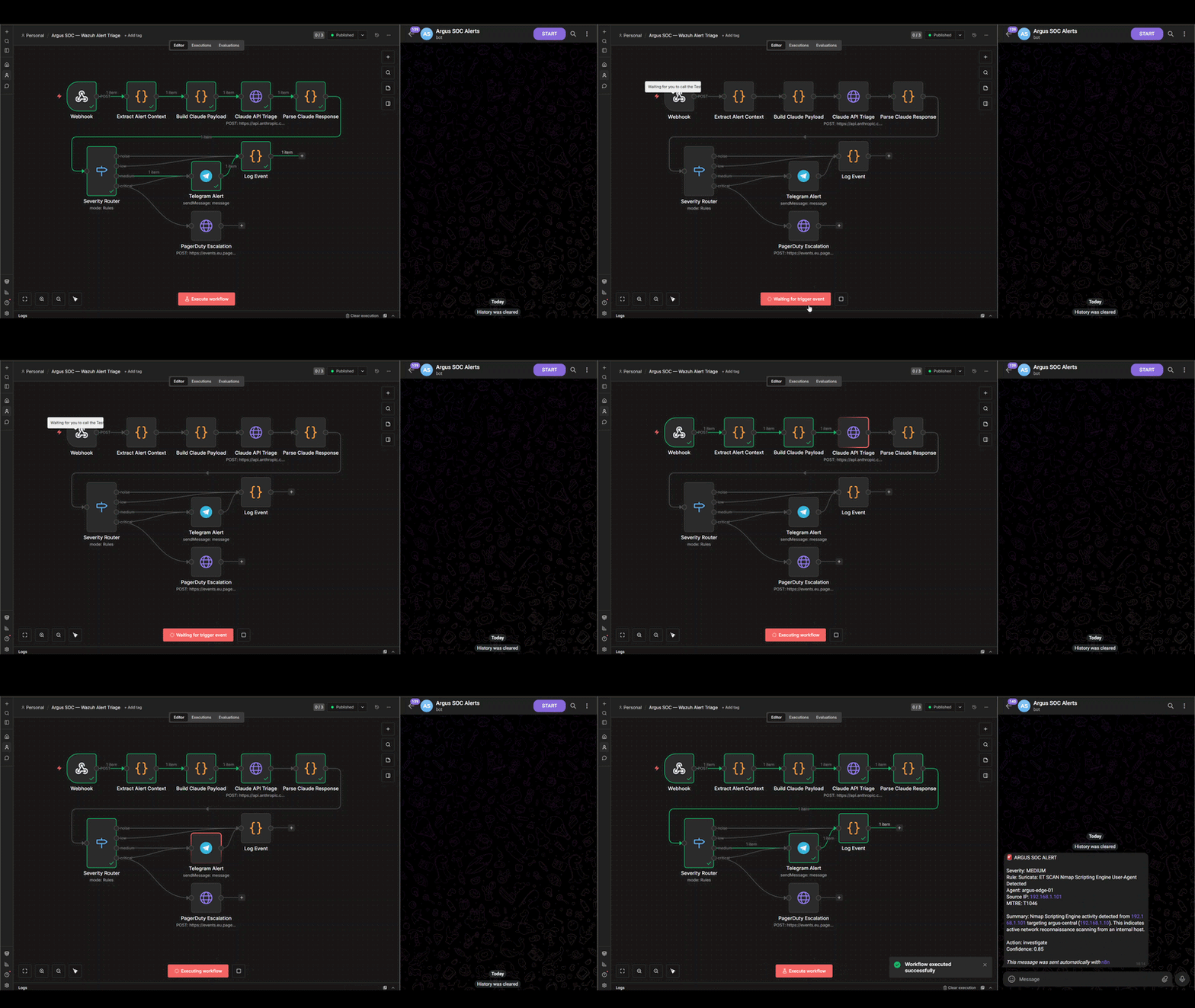 n8n alert workflow — Wazuh webhook → Claude triage → Telegram notification
The Pipeline in Action
Once all six checks pass, the full detection-to-notification loop is operational:
1
2
3
4
5
6
7
8
9
10
11
12
13
14
15
Suricata (eth1 SPAN interface, Pi 3B+)
  ↓ eve.json
Wazuh Agent (Pi 3B+)
  ↓ port 1514 — direct internet
Wazuh Manager (Hetzner)
  ↓ webhook — localhost:5678
n8n
  ↓ level 10+ filter
Claude API (claude-haiku-4-5-20251001)
  ↓ structured JSON: severity + MITRE + summary
Severity Router
  ├── noise    → silent log
  ├── low      → daily digest
  ├── medium   → Telegram ⚠️
  └── critical → Telegram 🚨 + PagerDuty
Every alert that clears the pre-filter arrives in Telegram with a plain-English summary, MITRE technique, source IP, and severity classification — written by Claude, not a static rule.
What’s Next — Phase 2
With the detection and triage pipeline live, Phase 2 adds active threat intelligence collection:
- Cowrie SSH Honeypot on Pi 3B+ — port 22 becomes a trap. Every credential brute-forced, every command typed by an attacker, every file they try to download is logged and forwarded to Wazuh
- Attack targets on Pi 5 are ready for Phase 4 red team scenarios
Part of the Argus SOC build series.